
It means one question for whoever hosts your site, this week: "Has the October 21 PHP security update been installed on my site?" If the answer is yes, this particular flaw is handled. If nobody can tell you, that's worth fixing before anything else on your list.
Here's what happened, why WordPress is in the headlines, and the bigger question it raises.
What happened
On October 21, 2026, the PHP project released fixes for two critical flaws in PHP itself, the programming language WordPress is built on. The security firm Wiz Research found them and named the pair PHP2Shell. In its write-up (opens in a new tab), Wiz says the flaws "can allow unauthenticated attackers to execute code on affected servers or read sensitive process memory."
In plain terms: someone with no login and no password can send a carefully built request to a vulnerable site and run their own code on the server it lives on. That's the most serious kind of flaw there is. The PHP project's advisory (opens in a new tab) rates both at 9.2 out of 10 and says updating is the only complete fix.
Wiz tested it on the current version of WordPress and took over the site without logging in. It did the same with Drupal and Joomla, two other popular website systems built on PHP.
It's PHP, not WordPress, and that's the point
The flaw isn't in WordPress's own code, or in any plugin. Wiz notes that "even a simple 'Hello World' application running on an affected PHP version can be vulnerable." A perfectly kept WordPress site, every plugin current, was still exposed.
That surprises a lot of owners, because "keeping WordPress updated" usually means clicking the update buttons inside WordPress. Those buttons don't touch PHP. PHP lives one layer down, on the server, and it's updated by your host. Your site is only as current as the host's last round of updates.
One in three WordPress sites is running PHP that no longer gets fixes
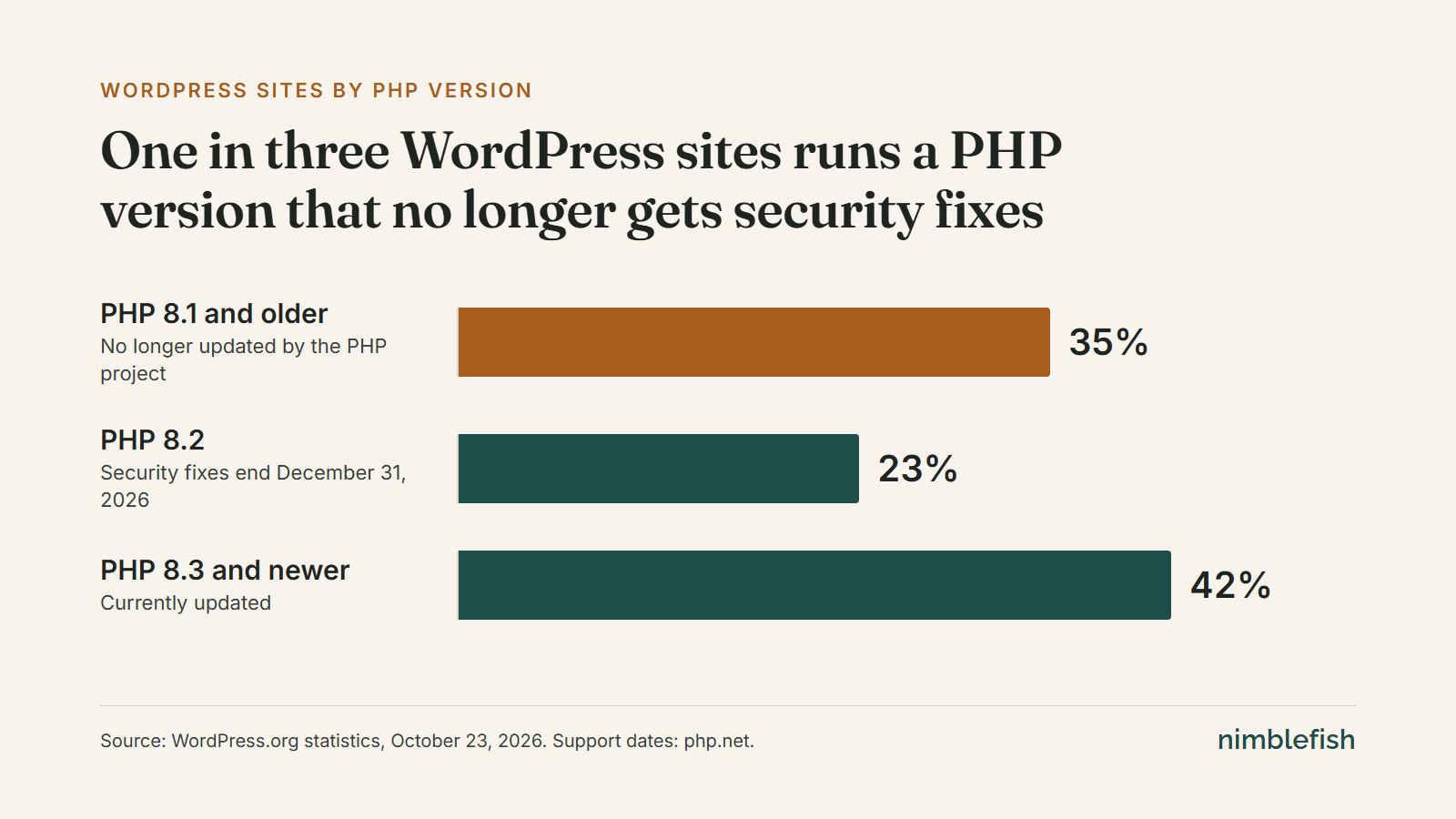
WordPress.org publishes which PHP versions its sites run. On October 23, about 35% of WordPress sites reported PHP 8.1 or older: versions the PHP project no longer updates (opens in a new tab). The project published one-time fixes for some of them this week, for hosts willing to build them by hand, and some hosts patch older versions on their own. Whether yours does is a question only your host can answer.
Another 23% run PHP 8.2, which stops getting security fixes (opens in a new tab) on December 31, 2026. Put together, more than half of WordPress sites will be on a version PHP no longer fixes by New Year's Day.
The three questions to ask your host
- Has the October 21 PHP security update been installed on my site? You're looking for a plain yes, and ideally a date.
- Which PHP version is my site on? 8.3 or newer is the comfortable answer. 8.2 has until December 31.
- If it's 8.1 or older, how is it being patched? If the answer is vague, plan an upgrade. Upgrading PHP can break older themes and plugins, so it's a job to test, not a switch to flip.
If you don't know who hosts your site, that's the first thing to find out. Your web developer, your domain bill or your last hosting invoice will usually say.
The bigger question
This week's flaw will be patched and forgotten. The pattern behind it won't. A WordPress site depends on a stack of moving parts: the server, PHP, WordPress itself, a theme, a page builder and a dozen or so plugins. Each one gets security updates on its own schedule, from different people, and each update can quietly break one of the others. Keeping all of it safe is real, ongoing work, mostly invisible to the owner, and that work is the actual cost of running WordPress.
A modern site works differently. Its pages are built ahead of time and served as finished files from a worldwide network, so there's no PHP running on a server, and far less for anyone to reach. PHP2Shell has nothing to attack on a site like that. Neither did the last plugin flaw, or the one before it.
That's a big part of why we now build on modern frameworks. It doesn't mean anyone has to leave the water today.
Think of us as your WordPress lifeguard
We keep you safe while you're on WordPress, and when you're ready, we bring you in.
Keeping you safe is the everyday part: someone watching the layers you never see. For the WordPress sites we care for, checking that the host had installed this week's update was part of that work, and we confirmed it. That's what website care is for, and our website security page covers the rest of the basics.
Bringing you in happens on your schedule, when the upkeep stops making sense for your business. Our WordPress modernization page covers what a move involves, including keeping your Google rankings and your place in AI search answers along the way.
If your site isn't one of ours and you'd like a second pair of eyes, we're happy to look at what it runs on and tell you plainly where it stands.