
An ADA-compliant website is one people with disabilities can use, and the yardstick most organizations point to is WCAG, the Web Content Accessibility Guidelines. Meeting it is the work, and most of that work means checking the site the way a person uses it. Showing it is the record: what was checked, what was found, what was fixed, each with its date. The record is worth the most when it already exists before anyone asks for it.
Why the date matters
When a demand letter or complaint arrives, the conversation turns quickly to the work you can show. A record that starts the week the complaint came reads very differently from one that has been kept, month after month, for a year.
Nobody can backdate that kind of record. It only exists if it was started earlier. That's the whole case for starting now, while it's a website project and not a response.
This is general guidance, not legal advice. If you've received a demand letter or complaint, review it with your counsel.
Most of the checking takes a person
The questions that matter are about people. Can someone move through every page with only a keyboard? Does the page still work zoomed in to 200%? Can the text be spaced out without anything breaking? Does every button and form field make sense when a screen reader reads it aloud?
Answering those means using the site the way a person does, page by page, and writing down what happens.
A website accessibility checker can't do that part. It tests what a program can see, which is a small share of what WCAG asks, and only on the day it runs. Its report is one line in the record, never the record itself. More on that in Is a free accessibility checker enough for my website?
What a widget can't do
Accessibility overlays add a button to your site and promise the rest. A widget can't fix the website underneath it. The Federal Trade Commission ordered one overlay company to pay $1,000,000, and barred it from claiming, without evidence, that its product could make any website compliant.
The barriers get fixed in the site itself, and the work goes on the record.
What a record looks like
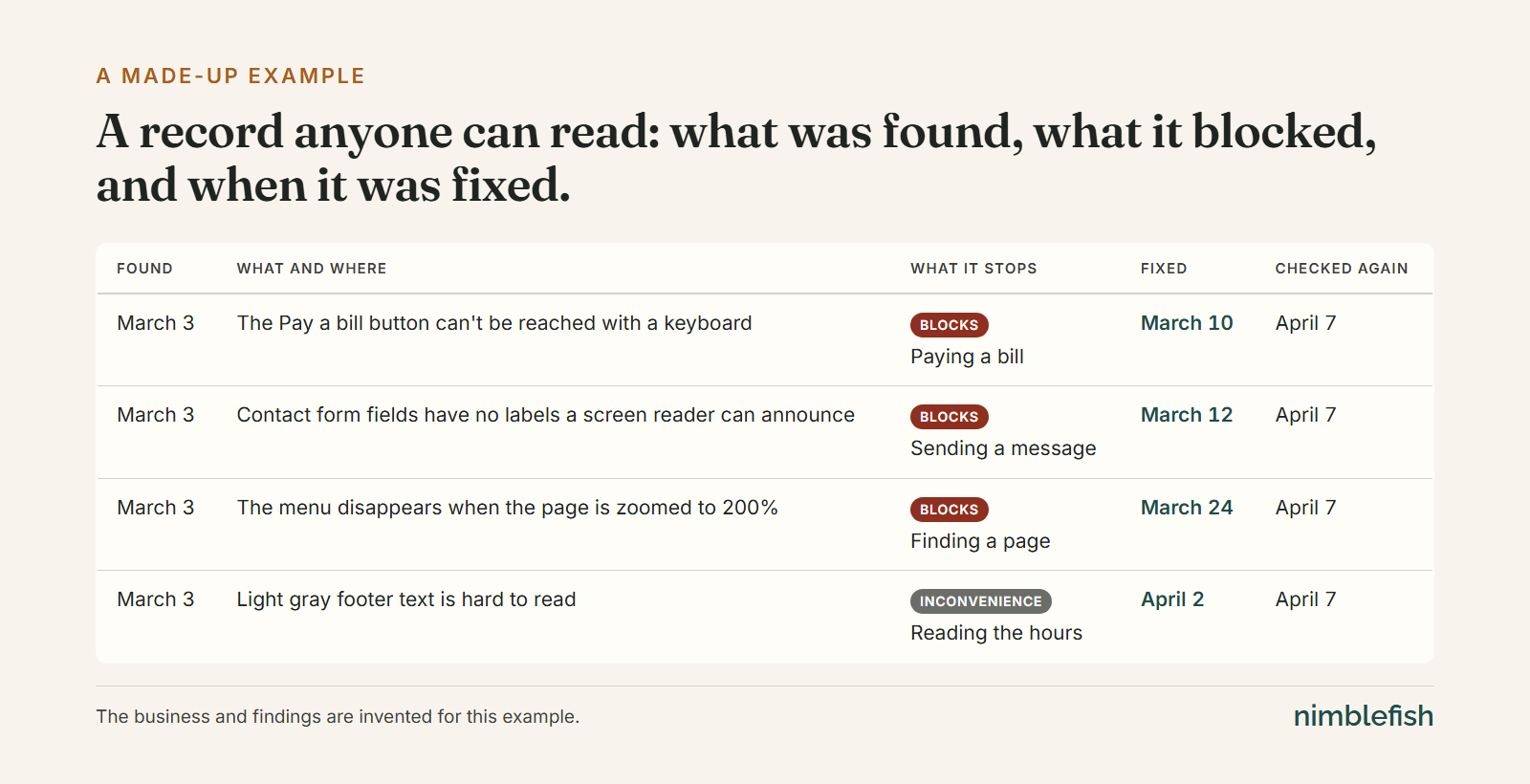
A useful record is plain:
- What was found, and where on the site.
- What it stops someone from doing. A low-contrast footer is an inconvenience. A checkout button a keyboard can't reach stops a sale.
- What was fixed, and when.
- When it was checked again, so the record shows the site getting better over time.
 (opens a larger, zoomable view)
Kept like that, it answers the questions a careful reader will ask, and it tells you where to put next month's effort.
Holding a site to its own standard
esther.ai builds this kind of record for organizations, over time: city halls and counties, and institutions from campuses to banks. Esther experiences a website as closely as it can to the way a person does, ranks each finding by what it stops someone from doing, and has human experts review the findings as the record grows.
So when we built esther.ai's own website, it had to hold up to the same record from the day it went live. We built it to WCAG 2.2 AA, checked every page by hand on launch day at phone, tablet and desktop sizes, and wrote every check down with its date. Every case on the site was read in its source document and carries its docket number.
The full story, with the five decisions behind it: It had to pass its own test.
Ash Harris, who founded nimblefish, is a partner in esther.ai.
Starting this week
- Walk your five most-used pages with only a keyboard. Tab through every link, button and form field. Write down anywhere you get stuck, with the date.
- Zoom each page to 200% and note anything that disappears or overlaps.
- Fix what blocks someone first, like a form or a checkout, then the inconveniences.
- Write an accessibility statement that says the standard you work to, how someone can tell you about a problem, and that you keep working on it. Say only what you can show.
- Put a date on the calendar to check again, and bring in someone who tests with a screen reader for the parts you can't.
Accessibility is built into every site we make, and we keep the work on record. Here's how we approach accessibility. If you'd like help starting your own record, let's talk.